Documentation
Dashboard overview
The home page widgets, global search, shortcuts, credits chip, and plan banners explained.
What it is
Dashboard home is your organization's home page: a snapshot of pipeline health, team activity, and today's interviews, plus the global header tools you'll use every day.
Who can use it
All roles. Widget data is scoped to your organization; some numbers (like team-wide stats) may be limited for viewers.
Where to find it
The sidebar is always on the left (collapsible). The header spans the top of every dashboard page.
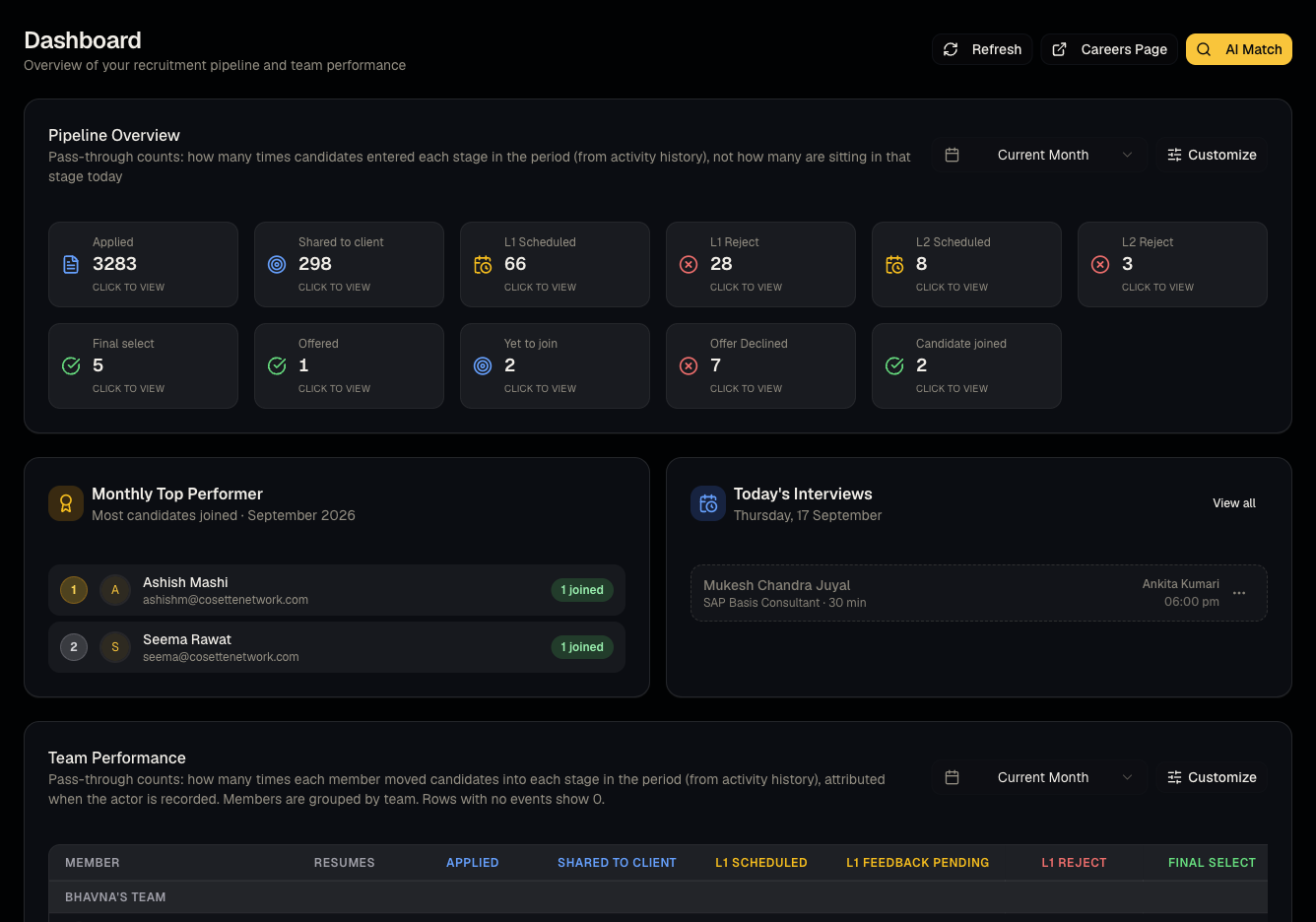
Steps: what's on the home page
- Time filter — switch the overview between daily, weekly, monthly, and all-time.
- Pipeline overview — configurable status columns showing candidate counts.
- Team performance table and monthly top performer.
- Today's interviews — scheduled live interviews happening today, linking into Interview scheduling.
Steps: header tools
- Global search — type 2+ characters to search candidates and jobs at once.
- Chat icon — opens a popup for team messages with an unread badge.
- Shortcuts (bookmark icon) — quick links you've saved, usually to report views. See Shortcuts.
- Credits chip — your organization's live Talynce credit balance. See What credits cost.
- Support (help icon) — opens Support tickets.
- Documentation — opens this guide in a new tab.
Steps: sidebar footer
- Usage widget — plan badge, candidates added today/this month, total candidates, seats used.
- Upgrade CTA — appears on trial/free plans.
- Plan banners — trial expiry countdown, free-plan upgrade prompt, or flex-plan expiry warning may appear above the page content.
Good to know
- The Credits chip is visible to every role, but the Credits page itself is admin-only — members and viewers who click it will see an access-denied message. This is expected, not a bug.
- If you're on an expired trial, write actions (creating jobs, editing candidates, uploading resumes) are blocked with an upgrade prompt even though the pages still load.
Common questions
- Why don't I see the Administration link? Only admins see it — see Roles and permissions.
- Why is my credits chip greyed out or unclickable for me? Only admins can open the Credits page; the chip itself remains visible to everyone as an indicator.
- Can I customize the pipeline overview columns? Yes, from the dashboard home widget settings (admin-configured pipeline statuses drive which columns are available — see Statuses, responses, and status emails).
- What does the plan banner at the top mean? It's a warning about your trial expiring soon, a prompt to upgrade from free, or a notice that your flex plan is about to lapse — click through to Plans and subscriptions to resolve it.
- Can I collapse the sidebar? Yes, use the collapse control at the top of the sidebar to switch to icon-only mode.
Related articles
Last updated: 9/17/20266 views