Documentation
Plans and subscriptions
Free, Solo and Team per-user pricing, and legacy trial/ATS plans explained.
What it is
Talynce's core ATS + AI Match is a subscription product; screening credits are purchased separately on top (see What credits cost).
Who can use it
Admins manage plans and subscriptions; all roles can see plan status via the sidebar usage widget and banners.
Where to find it
Sidebar → Plans; current status also shown in Settings → Account and Administration → Billing.
Steps
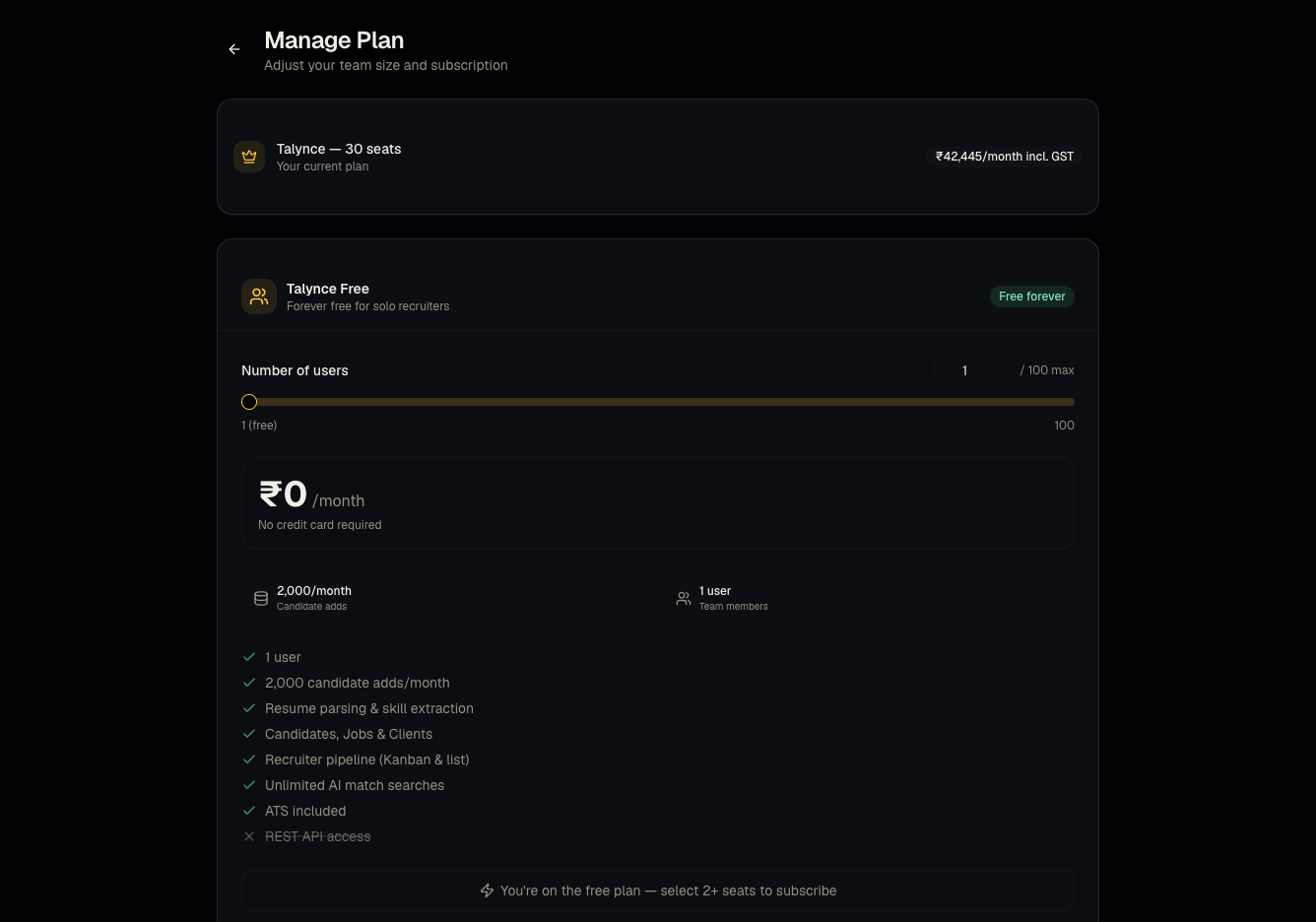
- Open Plans to see your current tier: free (1 user, 2,000 candidate adds/month, 2 active jobs at a time and 10 AI video interviews per billing period, ₹0 forever, no trial), a paid plan — Solo for just you, or Team for 2–100 users (no limit on candidate adds, priced per user per month with GST shown; adding a second user moves Solo to Team) — or a legacy trial/ATS plan if your organization predates the current pricing model.
- Use the seat calculator to estimate the cost of Solo, or of Team for your team size, and choose Monthly or Yearly billing: yearly is 10% less and is charged as one payment covering twelve months.
- Subscribe or add seats via the Razorpay checkout flow.
- From the pricing page. The pricing page has a plan builder: choose Monthly or Yearly billing, the number of licences (users) and, if you want them, a credit pack, and the summary shows the licences, the yearly discount if you took it, the credits, 18% GST and the total. Next opens the Checkout page (after you create your account, if you don't have one yet). There you pay in two steps, one after the other: Pay for licences opens Razorpay's subscription page in a new tab (the Checkout page notices by itself when it is paid), and Pay for credits buys the pack in Razorpay's checkout. Either can be paid first, and you can still change the licences or the pack on the Checkout page before paying.
- Review current plan, seats, and usage limits any time on Administration → Billing.
Good to know
- Free is a genuine permanent plan, not a trial — it doesn't expire, but it caps you at 1 user, 2,000 candidate adds/month, 2 active jobs at a time and 10 AI video interviews per billing period. Talynce can change the last two numbers; Administration → Billing shows your organization's exact limits and how much is used. Free organizations can buy credit packs without subscribing (see What credits cost).
- Active jobs on Free. Only jobs with the status Active count; drafts, paused, closed and filled jobs don't. At the limit, Publish, Activate and Reopen are refused with a message saying so, while Save Draft still works. Pause, close or fill a job to free a slot. If you already have more active jobs than the limit (for example after moving down from a paid plan), they stay active, and you can't activate another until you are back under it.
- AI video interviews on Free. An interview counts when it is created for a candidate — an invite is sent, or an application sets one up — whether or not the candidate takes it. Retakes and resent invites of the same interview aren't counted again. Once the period's interviews are used, new applicants get a plain application confirmation instead of an interview link, and new invites are refused, until the count starts again at the next billing period (the 1st of the month, or your old billing day if you once subscribed). Interviews already sent still work.
- Trial is legacy — new organizations are no longer created with a trial plan. If your organization is still on trial, you'll see expiry banners as the deadline approaches; write actions across jobs/candidates/uploads are blocked once it expires.
- Yearly billing is 10% off the licences. Twelve months are charged in one payment on the day you subscribe, and it renews a year later. The credit packs are one-time purchases either way, so the discount does not touch them. Which one you are on is shown on Administration → Billing.
- Switching between monthly and yearly is not something you can do yourself: adding licences keeps the cycle your subscription is already on. Contact support to change it.
- Welcome credits. A new organization gets welcome credits when it signs up; the pricing page shows how many. They appear in the credit history on Administration → Credits as welcome credits.
- Global talent pool reveal/apply specifically requires a paid plan (Solo or Team) — free and trial/expired organizations can browse but not act. Credit packs are different: a free organization can buy them.
Common questions
- What happens when my trial expires? You keep read access, but creating/editing jobs and candidates, bulk uploads, and talent-pool actions are blocked until you upgrade.
- Can I stay on Free forever? Yes, within its limits: 1 user, 2,000 candidate adds a month, 2 active jobs at a time and 10 AI video interviews per billing period.
- Why can't I publish another job on Free? You already have as many active jobs as the plan allows. Save it as a draft, or pause, close or fill another job first. Subscribing removes the limit.
- Why did my applicants stop getting video interviews? On Free, the billing period's AI video interviews are used up. The Screening page and Billing page say so, with the date the count starts again. Subscribing removes the limit.
- Does upgrading unlock AI Calling Agent automatically? AI Calling Agent availability is a separate feature flag from your subscription plan — see Set up AI Calling Agent.
- Can I downgrade from Solo or Team back to free? Check Administration → Billing for downgrade options; downgrading will re-apply the free plan's limits (1 user, 2,000 candidate adds, and its caps on active jobs and AI video interviews). Jobs that are already active stay active.
- How much does yearly save? 10% of the licences. At ₹1,199 per user per month that is ₹12,949 a year per user instead of ₹14,388, before GST.
- Is the whole year charged up front? Yes — that is what the 10% is for. The summary on the pricing page and the checkout both say so before you pay.
- Can I move from monthly to yearly later? Contact support. Adding licences on your own never changes the cycle.
- Does the seat calculator include GST? Yes, the seat calculator on the Plans page displays GST alongside the base per-user price.
- Is GST charged on credits too? Yes. Licences and credit packs are both priced before GST, and 18% GST is added to each at checkout.
- We need more than 100 users. That is the Enterprise plan, priced on request: use Contact sales on the pricing page.
Related articles
Last updated: 11/19/202610 views