Documentation
Pipeline statuses vs candidate responses vs status emails
Three related but different concepts that all live near the pipeline drawer — don't mix them up.
What it is
Talynce has three separate concepts that all show up around the Pipeline, and they're easy to confuse:
- Pipeline status — the hiring stage itself (Applied, Screening, Interview, Offer, Hired, Rejected, or any custom stage your admin has enabled).
- Candidate response — a short disposition label recorded after outreach (e.g., "Interested," "Not reachable," "Not interested") — purely informational, not a hiring stage.
- Status update email — an optional automatic email sent to the candidate when their pipeline status changes to specific stages.
Who can use it
All roles see statuses and responses on cards. Only admins configure which statuses exist, which responses exist, and which status changes trigger emails — all from Settings.
Where to find it
- Pipeline statuses: Settings → Pipeline Statuses (admin only)
- Candidate responses: Settings → Candidate Responses (admin only)
- Status update emails: Settings → Candidate status update emails (admin only)
- All three are used from the Pipeline drawer.
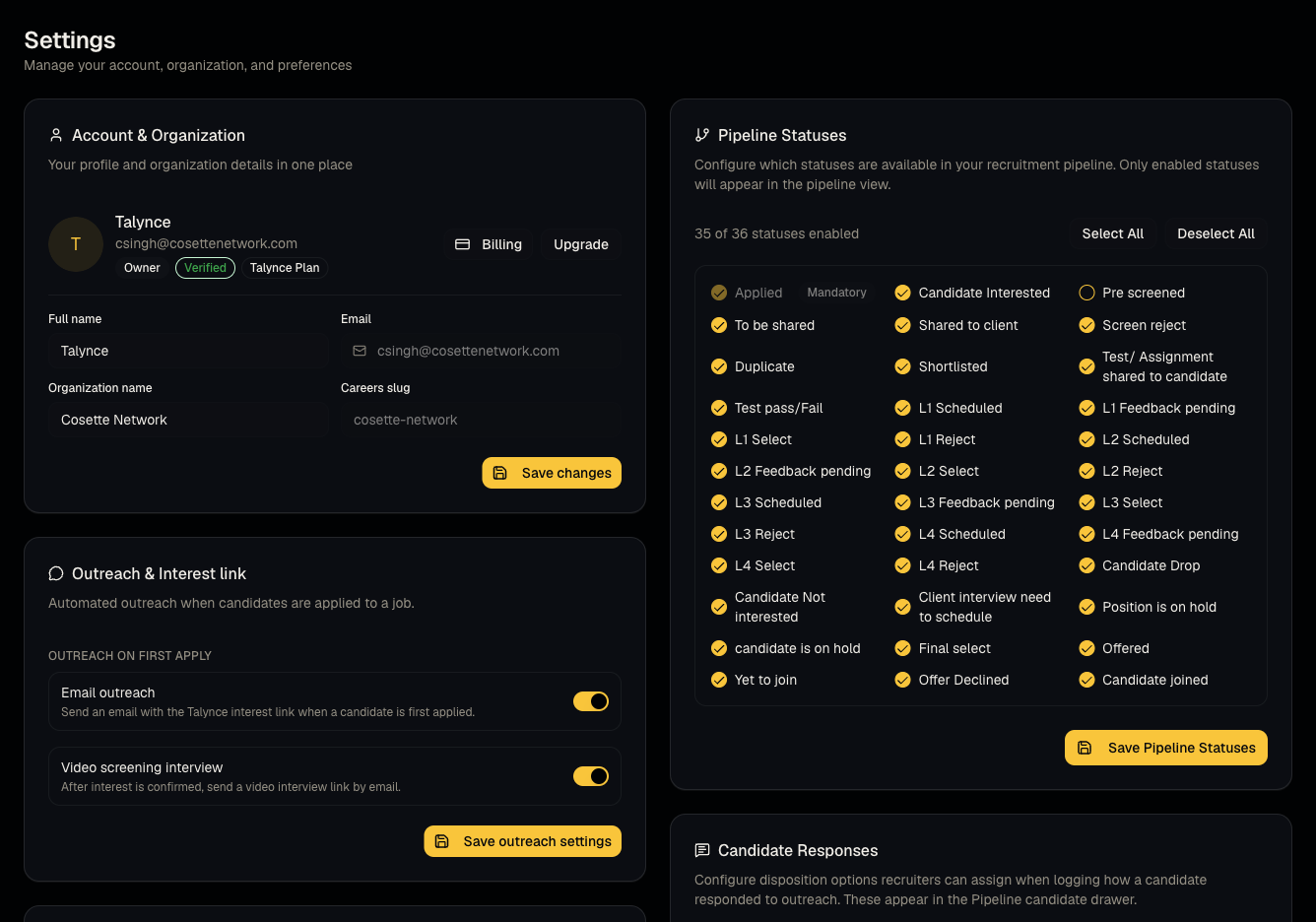
Steps: configuring statuses (admin)
- Go to Settings → Pipeline Statuses.
- Check/uncheck which stages your organization uses. Applied is mandatory and cannot be disabled.
- Save Pipeline Statuses.
Steps: configuring responses (admin)
- Go to Settings → Candidate Responses.
- Add new response labels, or use the seeded defaults.
- Reorder or deactivate responses you no longer use — deactivating doesn't delete responses already recorded on candidates, it just removes the option going forward.
Steps: configuring status emails (admin)
- Go to Settings → Candidate status update emails.
- Turn on Send status updates.
- Optionally narrow which specific stages trigger an email (only stages with an email template configured are offered).
- Save status email settings.
Good to know
- Status emails are off by default. Until an admin explicitly turns this on, moving a candidate's status never emails them.
- Even when enabled, certain internal stages never trigger an email — for example, Shared to client, Duplicate, and the very first time a candidate reaches Applied (since that's not a meaningful update for them).
- Each status change sends at most one email per stage per candidate — moving someone back and forth won't spam them.
- A custom pipeline status your org added won't appear as an option in the status-email picker unless it has an email template behind it — plain custom labels are silent by default.
- Deleting/deactivating a Candidate Response that's already assigned to candidates doesn't remove it from their record — it's just hidden from the picker for new selections.
Common questions
- Will candidates get an email every time I move their card? Only if your admin enabled status emails and the destination stage is in the allow-list.
- What is a "Candidate Response" for if it's not a pipeline stage? It's a quick way to log how an outreach or call went (e.g., after a WhatsApp/email outreach or AI call) without changing where they sit in the pipeline.
- Why can't I uncheck Applied in Pipeline Statuses? It's the mandatory entry stage for every application.
- I added a custom status — why doesn't it show up as an email option? Custom statuses need an email template configured; contact support to add one if needed.
Related articles
Do not confuse with
- Outreach settings (Email outreach / video screening interview toggles) are a different Settings section entirely — see Outreach and interest links.
Last updated: 9/17/20264 views