Documentation
Pipeline drawer actions
Notes, activity log, resend video invite, tailored resume download, and removing a candidate.
What it is
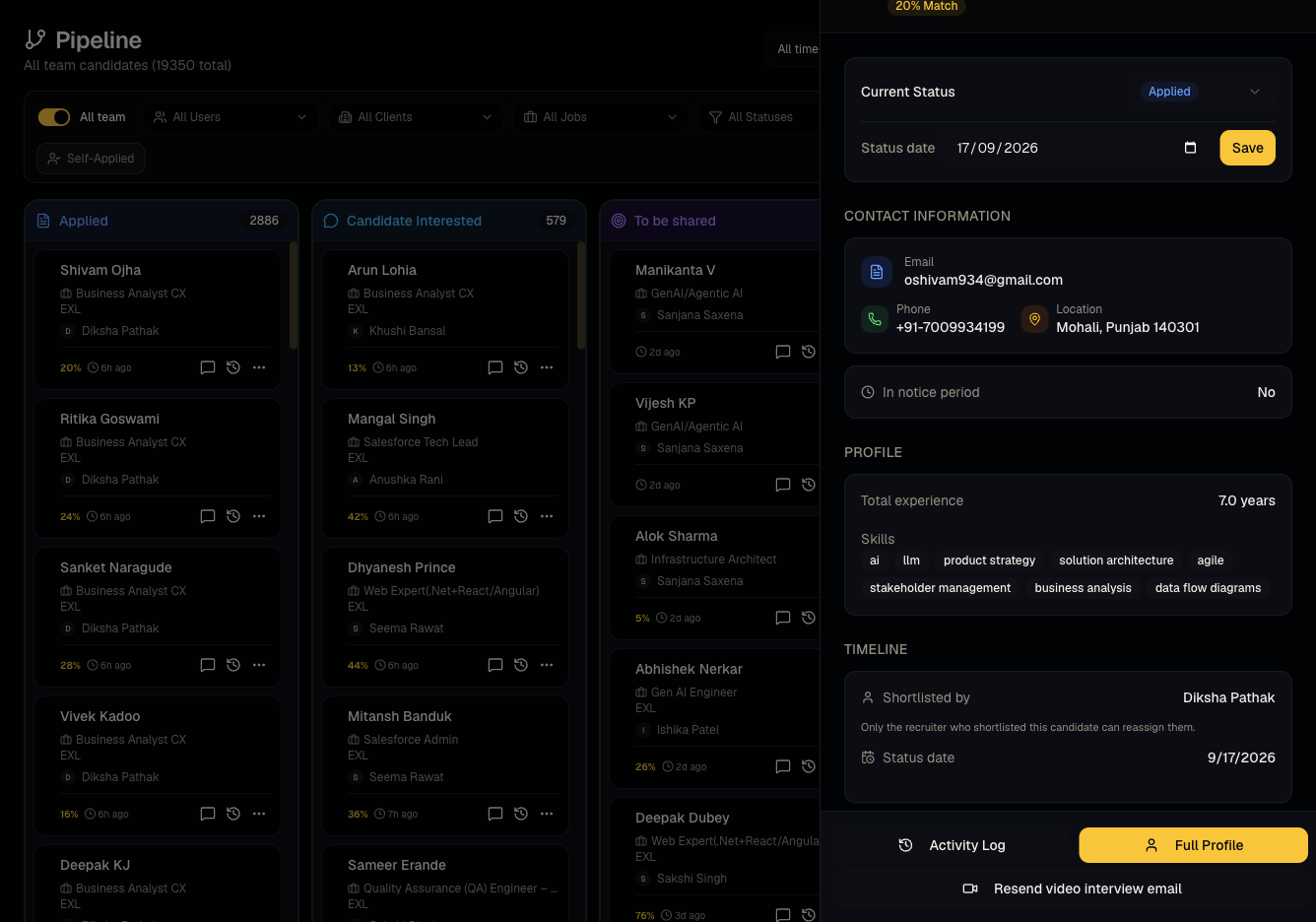
Clicking a candidate's card on the Pipeline board opens a drawer with everything specific to that candidate-job application.
Who can use it
Admins and members can act; viewers can open the drawer read-only.
Where to find it
Click any card on Pipeline.
Steps
- Status — change the pipeline stage directly from the drawer (alternative to dragging the card).
- Recruiter — see or reassign who owns this candidate for this job.
- Status date — when they entered the current stage.
- Pre-interview questions — review their apply-form answers if the job has any (see Pre-interview questions).
- Notes — free-text notes visible to your team.
- Candidate Response — set a disposition from your org's configured list (see Statuses, responses, and status emails).
- Activity Log — full audit trail of changes to this application.
- Resend video interview email — re-sends the video invite link.
- Download Job-Tailored Resume — generates/downloads a PDF resume tailored to this specific job.
- Remove — removes the candidate from this job's pipeline (Applied stage only).
Good to know
- Remove only works from the Applied column, and typically only for admins/the owning recruiter — once a candidate has moved past Applied, removing them isn't available from the drawer.
- Resend video interview email can silently no-op with a toast explaining why: it's disabled if the candidate has no email on file, if a video invite was already sent recently, if the job has no interview questions, or if video screening is disabled for your organization.
- Download Job-Tailored Resume is cached — regenerating only happens automatically if the underlying resume, the job, or screening results have changed since the last download. Don't expect a new PDF on every click if nothing changed.
- Candidates who applied through your public job link directly (self-applied /
applied_via: public_job_link) may show no recruiter attribution — that's expected, not a data error. - Only the recruiter who originally shortlisted a candidate (or an admin) can typically reassign the recruiter field — this prevents accidental takeovers of a teammate's candidate.
Common questions
- Why is Remove greyed out? The candidate isn't in the Applied column, or you don't have permission (viewer, or not the owning recruiter/admin).
- Why won't Resend send anything? Check the toast message — it explains the specific skip reason (no email, already sent, disabled, or no questions).
- Does the tailored resume update automatically? Only when something relevant changes; otherwise it serves the cached version.
- Where do I see everything that's happened to this application? The Activity Log in the drawer.
Related articles
Last updated: 9/17/20263 views