Documentation
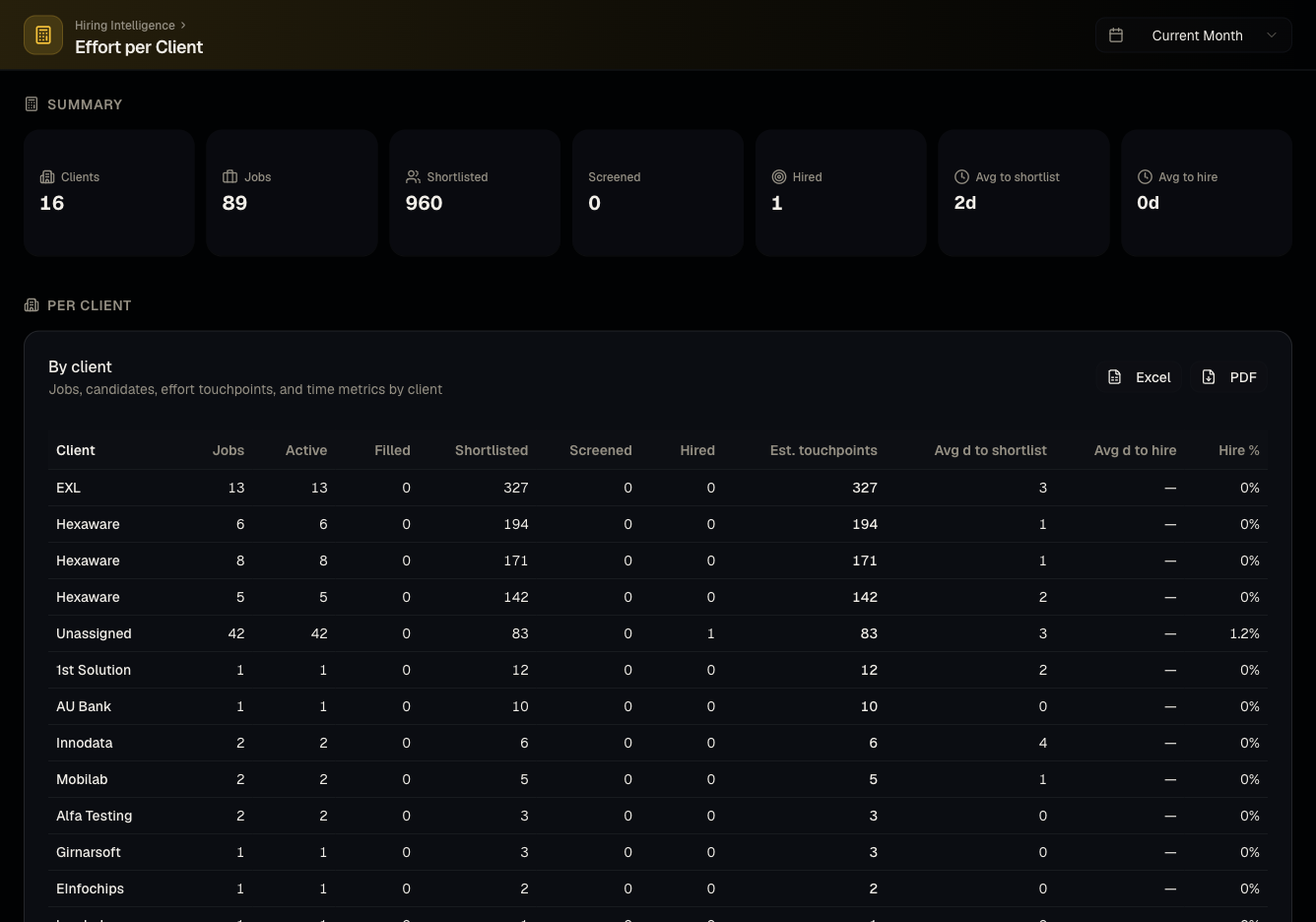
Effort per client report
See recruiter workload and effort distributed across clients and open roles.
What it is
Estimates how much recruiting effort/workload is going into each client relative to their open roles — useful for staffing and billing conversations.
Who can use it
All roles.
Where to find it
Steps
- Review effort estimates broken down by client and job.
- Compare against the number of open roles each client has to spot over/under-served clients.
Good to know
- This is an estimate derived from recruiting activity (applications, screenings, pipeline movement), not a manual timesheet — treat it as directional rather than exact.
- A client with very few jobs but high activity can still show high estimated effort relative to a client with many quiet jobs.
Common questions
- Is this a real time-tracking tool? No — it's an estimation based on recruiting activity, not manually logged hours.
- Can I use this to justify staffing changes to a client? It's a reasonable starting point, but pair it with qualitative context — the estimate doesn't capture everything a recruiter does off-platform.
- Does closing a job remove it from this report's history? No, past effort remains attributed to the job even after it closes.
- Can I filter to a single recruiter's effort across all their clients? Yes, use the recruiter filter alongside the client breakdown.
Related articles
Last updated: 9/17/20263 views