Documentation
Pre-screened applications
Applications with apply-form answers, before any video interview happens.
What it is
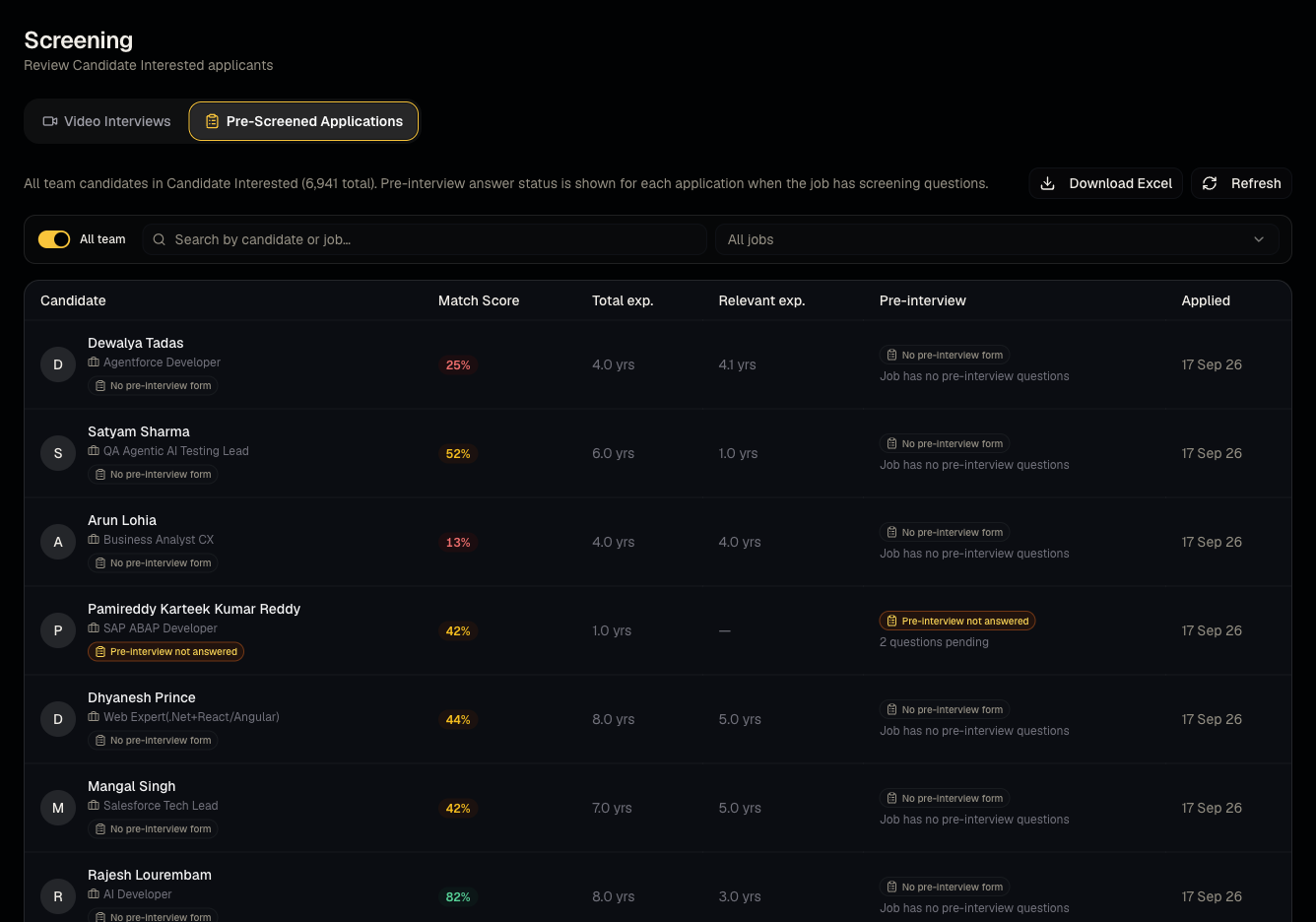
This tab lists candidates who've submitted answers to a job's pre-interview (apply-form) questions — a lighter-weight screening step than a full video interview.
Who can use it
Everyone can view.
Where to find it
Sidebar → Screening → Pre-Screened Applications tab.
Steps
- Toggle Show all team to see applications across recruiters, not just your own.
- Open an application to read every pre-interview answer.
- Export the current view if needed.
Good to know
- Pre-screened applications and video interviews are tracked separately — a candidate can appear here without ever having a video interview if the job only has apply-form questions, or in both tabs if the job has both question types.
Common questions
- How is this different from Video Interviews? This tab is text-based apply-form answers; Video Interviews is on-camera AI-scored sessions.
- Where do these questions come from? The job's Pre Interview tab — see Pre-interview questions.
- Can I move a pre-screened candidate straight into the pipeline? Yes — reviewing their answers here doesn't change their pipeline status; use Pipeline to advance them.
- Does this tab include candidates who applied but skipped the questions? Only candidates who submitted answers appear here; skipped/incomplete apply-form submissions may not show up.
Related articles
Last updated: 9/17/20262 views